> ## Documentation Index
> Fetch the complete documentation index at: https://docs.acelabusa.com/llms.txt
> Use this file to discover all available pages before exploring further.
# Library Set Up in 3 Easy Steps
> If you are working with he Acelab team to implement your library, setting it up is as easy as 1-2-3.
*Written by Armaan Shah · Updated February 10, 2026*
Don't know what the Acelab's Library is? Check out the full article.
With the Materials Hub support, our team will do the heavy lifting to set up your digital Library in Acelab.
Confused about how that's gonna happen? Don't worry! See the 3 steps illustrated below and keep reading to learn more.
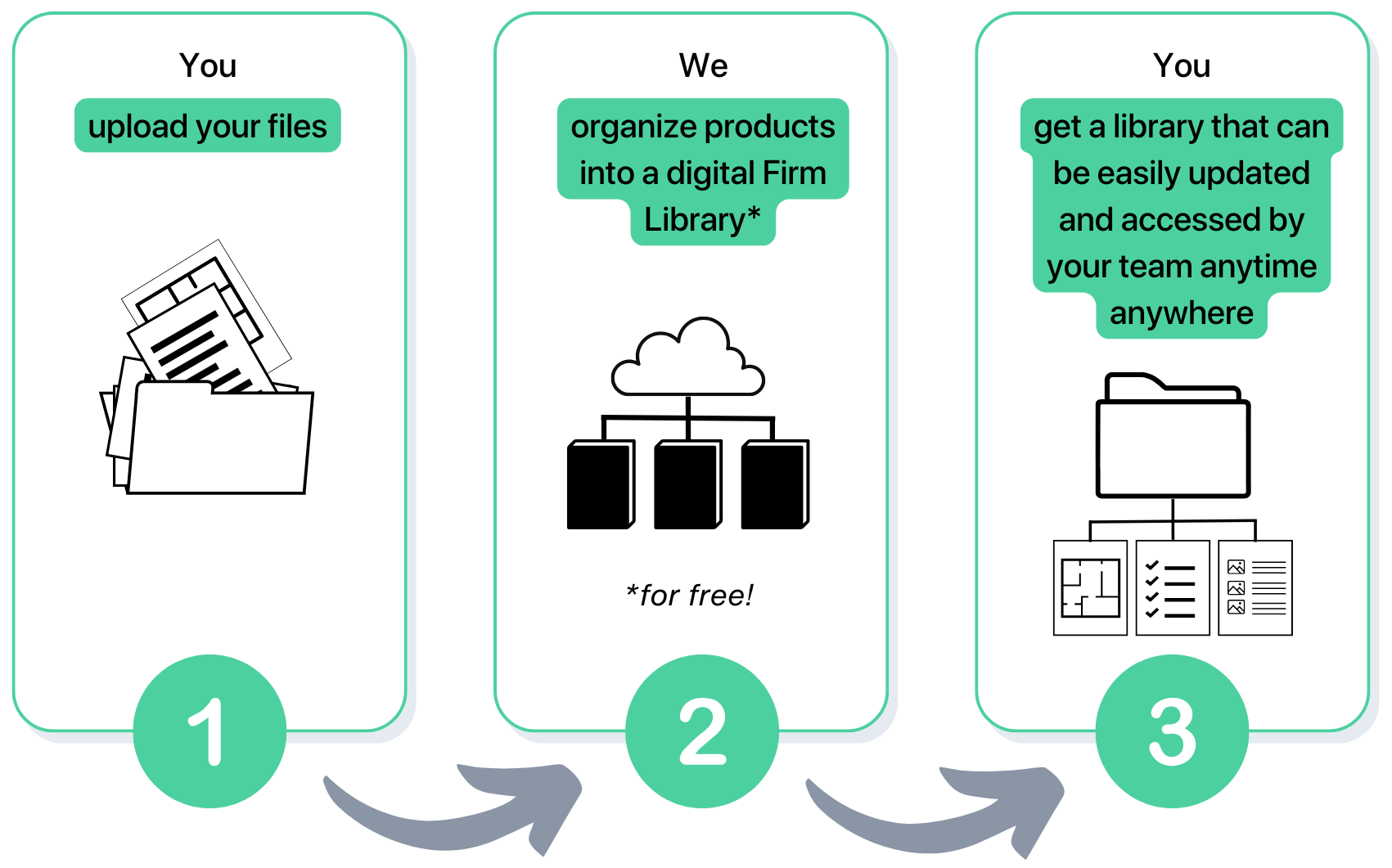 ## Step 1: You upload your files to our portal
We will use information from your construction documents, specifications, schedules, and bid packages to extract information about the products you have used in the past.
Instructions on what and how to submit documents are included [here](/help-center/building-your-firm-library/recommendations-for-file-upload). Following our instructions will help ensure a smoother and faster process.
Once your documents are submitted you will receive a message from our team in your **Acelab Conversation Portal** informing you of when our implementation team will start building your Library
***
## Step 2: We organize products into a digital Library
Now, it's our turn to get to work.
We will use magic (not really - we'll use our proprietary AI tool) to extract product information from your files. Each product will be added to the digital library along with publicly available information about them.
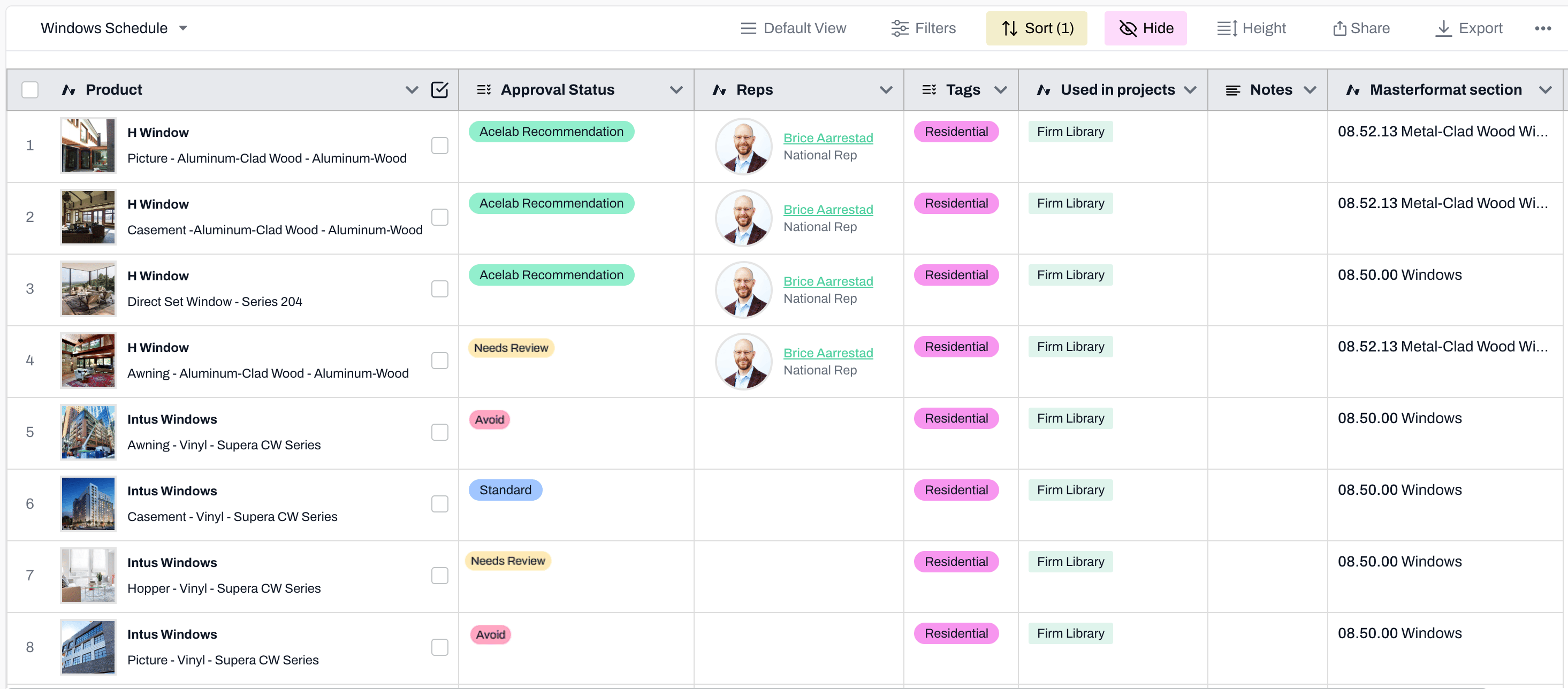
The library is neatly organized into categories (i.e. CSI Masterformat divisions). And, the following columns are included:
* Product Name
* Approval Status (Standard, Needs Review, Avoid, Acelab Recommendation)
* Tags (Residential, Commercial, Industrial, etc)
* Notes
* Masterformat
* Reps
* Used in Projects
These columns include a mix of [default and custom fields](/help-center/working-on-projects/understanding-schedule-field-types). You can edit them and add new fields to fully customize your library.
## Step 1: You upload your files to our portal
We will use information from your construction documents, specifications, schedules, and bid packages to extract information about the products you have used in the past.
Instructions on what and how to submit documents are included [here](/help-center/building-your-firm-library/recommendations-for-file-upload). Following our instructions will help ensure a smoother and faster process.
Once your documents are submitted you will receive a message from our team in your **Acelab Conversation Portal** informing you of when our implementation team will start building your Library
***
## Step 2: We organize products into a digital Library
Now, it's our turn to get to work.
We will use magic (not really - we'll use our proprietary AI tool) to extract product information from your files. Each product will be added to the digital library along with publicly available information about them.
The library is neatly organized into categories (i.e. CSI Masterformat divisions). And, the following columns are included:
* Product Name
* Approval Status (Standard, Needs Review, Avoid, Acelab Recommendation)
* Tags (Residential, Commercial, Industrial, etc)
* Notes
* Masterformat
* Reps
* Used in Projects
These columns include a mix of [default and custom fields](/help-center/working-on-projects/understanding-schedule-field-types). You can edit them and add new fields to fully customize your library.
 ***
## Step 3: You get a neatly organized digital library
When your newly created digital library is ready to be reviewed, you'll receive a message from our implementation team on Acelab. Their completion message will include:
1. The total number of materials added to your library
2. 6 manufactures we recommend exploring based on our review of your history
3. Next steps to begin enriching your library
Then, we'll get on a call to hear your feedback and make adjustments as needed.
With your library ready, you and your team will enjoy:
* access to the library from anywhere anytime
* a central location for all product information, including documents and representative contacts
* permission levels set for each team member according to their role
* easy updates made by anyone with the appropriate permission
* integration with [Schedules](https://help.acelabusa.com/en/articles/9368377-navigating-schedules) and the [SpecPlanner](/help-center/working-on-projects/specplanner-overview)
* custom fields to add notes or any relevant information that should guide future materials decision-making
There is no need to wait. Check out the requirements for file upload and submit your documents now to get started.
***
## Step 3: You get a neatly organized digital library
When your newly created digital library is ready to be reviewed, you'll receive a message from our implementation team on Acelab. Their completion message will include:
1. The total number of materials added to your library
2. 6 manufactures we recommend exploring based on our review of your history
3. Next steps to begin enriching your library
Then, we'll get on a call to hear your feedback and make adjustments as needed.
With your library ready, you and your team will enjoy:
* access to the library from anywhere anytime
* a central location for all product information, including documents and representative contacts
* permission levels set for each team member according to their role
* easy updates made by anyone with the appropriate permission
* integration with [Schedules](https://help.acelabusa.com/en/articles/9368377-navigating-schedules) and the [SpecPlanner](/help-center/working-on-projects/specplanner-overview)
* custom fields to add notes or any relevant information that should guide future materials decision-making
There is no need to wait. Check out the requirements for file upload and submit your documents now to get started.