> ## Documentation Index
> Fetch the complete documentation index at: https://docs.acelabusa.com/llms.txt
> Use this file to discover all available pages before exploring further.
# Recommendations for File Upload
> Learn about requirements and recommendations to build your Library with Acelab's support.
*Written by Armaan Shah · Updated February 10, 2026*
## Overview
If your company [qualifies](/help-center/building-your-firm-library/getting-started-with-your-library), our team will build your digital Library in the Materials Hub. To get started, you must submit documentation with information about products your company has used in the past.
## Important
Our team will pull product information from the documents you submit. Therefore, quality of your Library depends on **the quality of files you submit**. Providing the recommended document types, such as specifications or material charts, allows us to upload between 100-600 products to your library.
If you submit **less specific documents**, like non-products-specific CDs, the Library will reflect this limitation, typically resulting in fewer than 50 products added.
If you submit **too much (or irrelevant information)**, our team will have to prioritize what to include. This prioritization may not reflect your firm's choices.
⭐ **To have a high quality Library, please read carefully and follow the instructions below.**
***
## Recommendations For All File Types
**File Format -** Save or export your files as **PDF or CSV**.
**File Quality -** Ensure any scans are **legible and high-quality**. Avoid blurry or low-resolution files.
**File Size -** Keep **file sizes manageable** for easy uploading and downloading. If a file is too large, consider compressing it.
**Merge Files -** Merge separate pages for each project into a **single PDF file**.
***
## Minimum Required Information
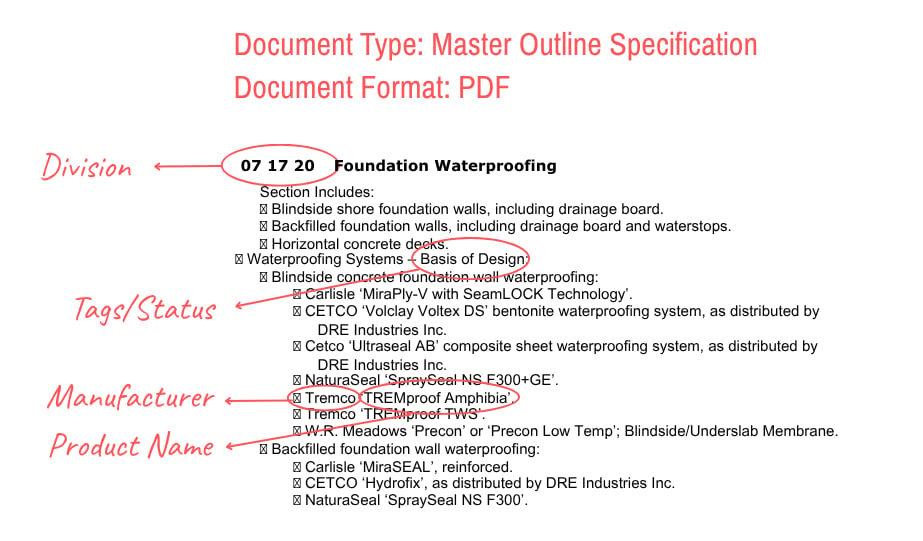
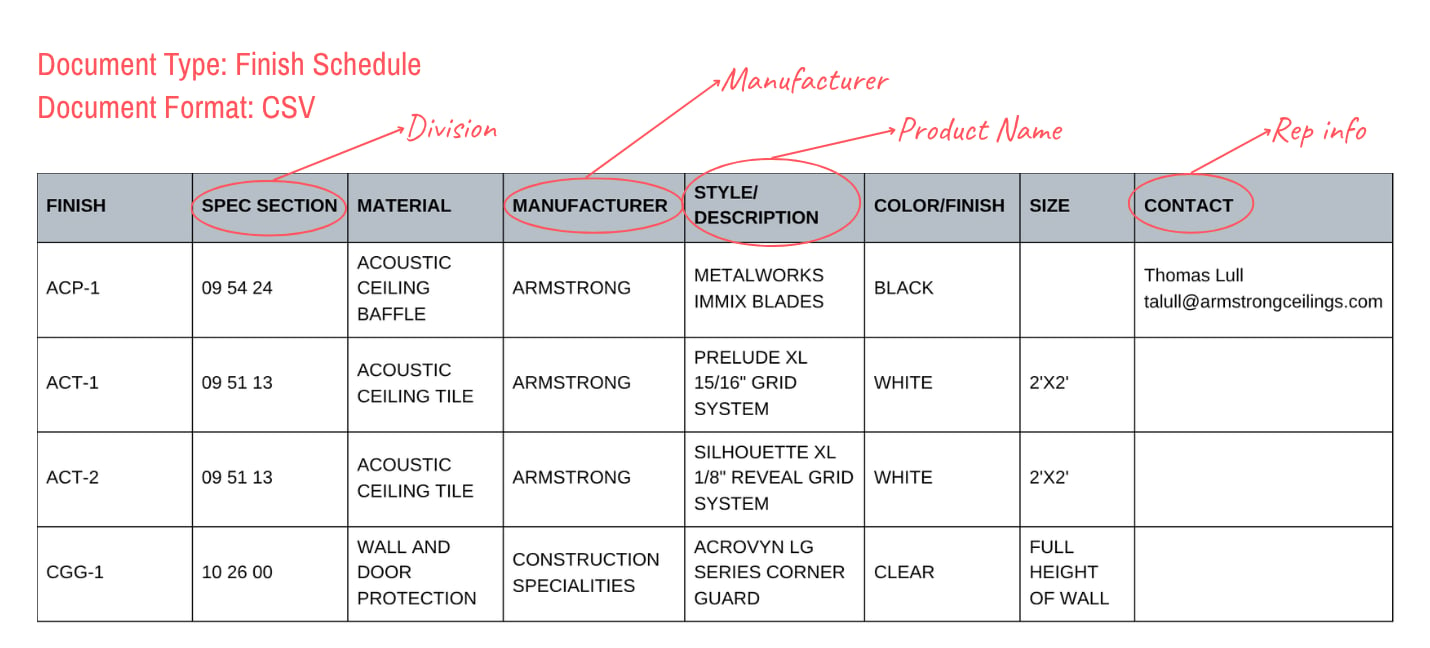
* Product Name
* Manufacturer
* Masterformat Section
## Recommended Additional Information
We can add additional information to your Library to make it even more helpful. Some additional fields you may add:
* Product Website
* Categories you need recommendations for
* Manufacturer Rep information (if you have someone you like working with)
* Product Tags (such as "preferred, alternative, do not use" etc)
## Examples
 ***
## Preferred Document Types
* ### Specifications
Specifications are one of the most helpful document sets for our Implementation team to work with.
* ### Finish Schedules
Finish schedules are incredibly helpful if setup in a spreadsheet. If these are in Google Sheets or Excel, we recommend exporting them as a CSV file before uploading.
***
## Check before submitting
Before uploading, make sure that you:
* Upload the most **current version** of the file
* **Name files** to clarify which projects they are referencing
* Avoid submitting file **duplicates**
* Combine all pdfs for any single project into **one file**
* Do not submit drawing heavy documents such as entire CD sets
Ask our team if you have any unique file type that you think is helpful.
***
## Implementation Time
Our turnaround time is typically 7-10 Business Days from the date you submit your files.
***
## How/Where to Submit Files
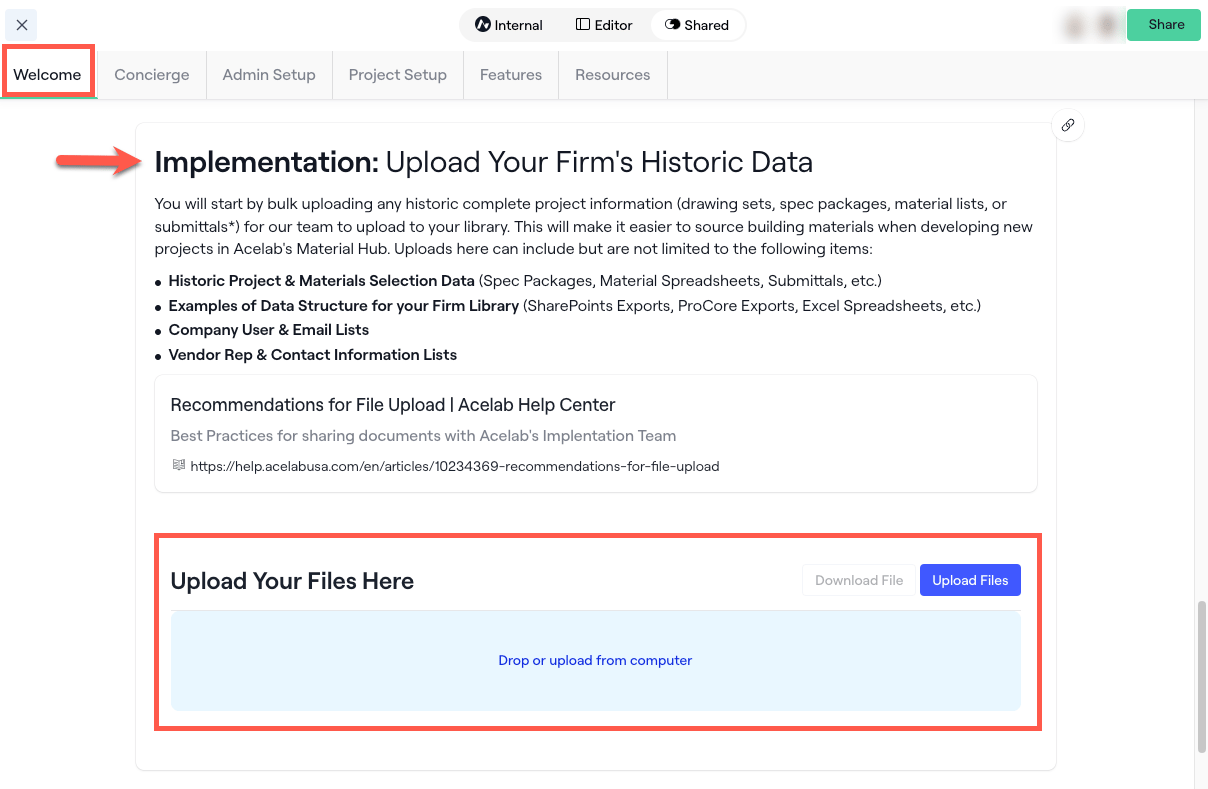
* Open your **Onboarding portal**
* This is the link our team sent to you, it starts with acelabusa.dock.us
* Scroll down to the **Upload Portal** section
* Use the **Upload Files** button, or drag and drop your files
***
## Preferred Document Types
* ### Specifications
Specifications are one of the most helpful document sets for our Implementation team to work with.
* ### Finish Schedules
Finish schedules are incredibly helpful if setup in a spreadsheet. If these are in Google Sheets or Excel, we recommend exporting them as a CSV file before uploading.
***
## Check before submitting
Before uploading, make sure that you:
* Upload the most **current version** of the file
* **Name files** to clarify which projects they are referencing
* Avoid submitting file **duplicates**
* Combine all pdfs for any single project into **one file**
* Do not submit drawing heavy documents such as entire CD sets
Ask our team if you have any unique file type that you think is helpful.
***
## Implementation Time
Our turnaround time is typically 7-10 Business Days from the date you submit your files.
***
## How/Where to Submit Files
* Open your **Onboarding portal**
* This is the link our team sent to you, it starts with acelabusa.dock.us
* Scroll down to the **Upload Portal** section
* Use the **Upload Files** button, or drag and drop your files