> ## Documentation Index
> Fetch the complete documentation index at: https://docs.acelabusa.com/llms.txt
> Use this file to discover all available pages before exploring further.
# AIA Materials Pledge Reporting
> What is the AIA Materials Pledge?
*Written by Armaan Shah · Updated February 10, 2026*
## What is the AIA Materials Pledge?
The American Institute of Architects (AIA) developed the Architecture & Design Materials Pledge to **inspire a positive shift in how architects and designers evaluate the products and finishes they specify**. The pledge focuses on creating healthier, more sustainable building environments through **intentional material specifications**.
### The Five Impact Categories
Firms participating in the Materials Pledge commit to supporting:
1. **Human Health** - Preferring products that support life throughout their life cycles and eliminating hazardous substances
2. **Social Health and Equity** - Choosing products from manufacturers that secure human rights in operations and supply chains
3. **Ecosystem Health** - Selecting products that support and regenerate natural air, water, and biological cycles
4. **Climate Health** - Prioritizing products that reduce carbon emissions and ultimately sequester more carbon than emitted
5. **Circular Economy** - Designing for resiliency, adaptability, disassembly, and reuse, aspiring to zero-waste construction
### Materials Pledge Reporting Requirements
The AIA Materials Pledge has established a formal reporting framework to track progress. The deadline for Materials Pledge reporting in 2025 is May 31.
### Reporting Structure
The reporting framework includes three levels:
1. **Firm-level reporting** - Includes general information about the firm, commitments, resources, knowledge, and implementation
2. **Project-level reporting** - Covers general material strategy questions that apply across selected projects
3. **Product-level reporting** - Details specific products used on projects and how they align with the five impact categories
The goal isn't to capture every product on every project but to encourage focused material goal setting and reporting that demonstrates progress toward healthier material selection.
### Resources for Materials Pledge Signatories
Several resources have been developed to support firms in meeting their Materials Pledge commitments:
* **[Materials Pledge Starter Guide](https://www.aia.org/sites/default/files/2024-11/AIA_Materials_Starter_Guide.pdf)**- Provides guidance on holistically evaluating building products
* **[A\&D Materials Pledge Reporting Guide](https://www.aia.org/sites/default/files/2025-02/AIA_Materials%20pledge%20guide_Jan25.pdf)** - Outlines the reporting process, methods, schedule, and structure
* **[Healthier Materials Protocol](https://www.aia.org/sites/default/files/2024-11/AIA_Healthier_Materials_Protocol.pdf)** - Offers practical methods to track and integrate sustainable materials selection
* **[AIAU Materials Certificate Program](https://aiau.aia.org/theme/aiau/details.php?id=1092)** - Provides education on material selection through essential courses
* **[Common Materials Framework (CMF)](https://www.mindfulmaterials.com/cmf-reference-guide)** - Developed by mindful MATERIALS, maps product certifications to the five impact categories
***
## How Acelab Supports Materials Pledge Reporting
### AIA Materials Pledge Reporting in the Material Hub
To streamline Materials Pledge reporting, the Material Hub includes product data and custom fields aligned with the Materials Pledge survey questions. Within a project in the Material Hub, you are able to:
1. **Create a Material Pledge Reporting view** - Display only products that meet the reporting criteria
2. **Add Product Fields** - Include appropriate product data that account for all product-related questions in the Materials Pledge Survey
3. **Impact Category Fields** - Add a product tag field and document fields for each of the five impact categories aligned with [mindful MATERIALS framework](https://www.mindfulmaterials.com/cmf-reference-guide)
4. **Collaborative Workspace** - Enables teams to work together on gathering and organizing material information needed for reporting
### How to complete AIA Materials Pledge Reporting in the Material Hub
#### 1. Open the Project (or create a new project)
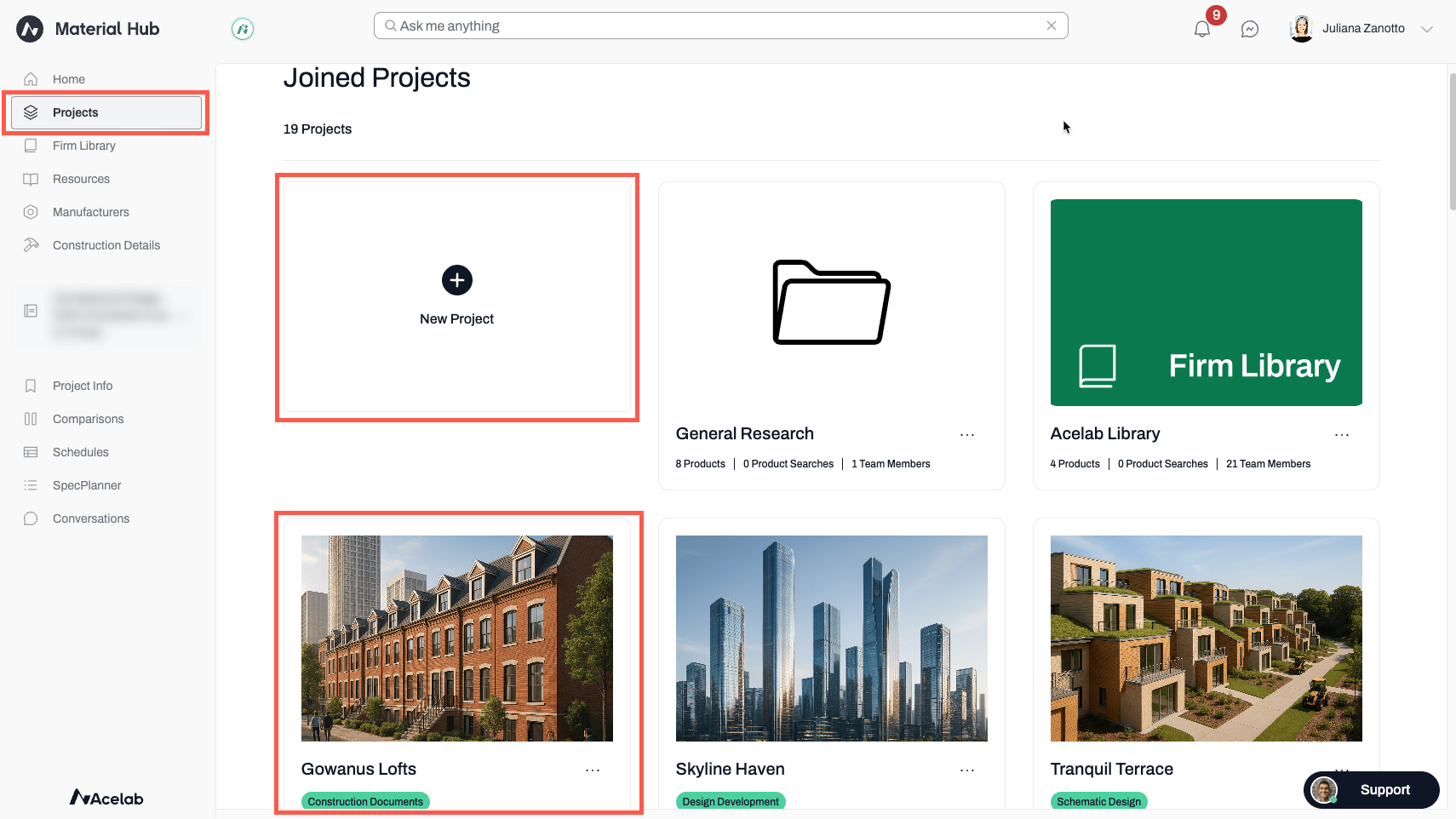
* From the Project Dashboard, click on the project you wish to create the report for
* Or, if you dont yet have a project, click on "New Project" to [create a project](/help-center/working-on-projects/project-setup-overview)
 #### 2. Create a Material Pledge Reporting View
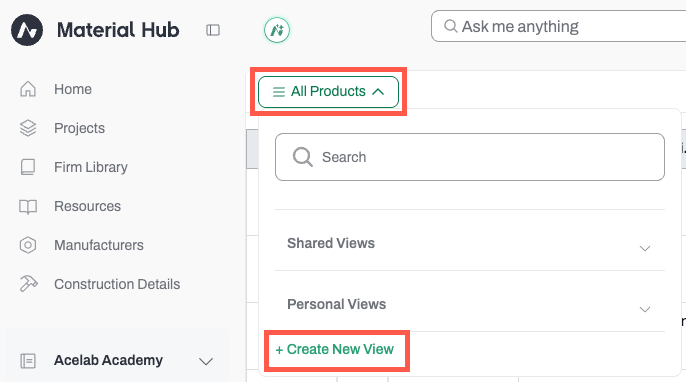
* Navigate to the project **Schedules** and click on the views menu (All Products)
* Select **Create a New View**
* Name it "Material Pledge Reporting"
* Keep the **Shared View** option toggled on, if you want this new view to be accessible to all project collaborators.
* Click **Save**
#### 3. Add Product Fields
* Click the **Add Fields** button to select all appropriate fields. We suggest adding the following Default fields:
* **Category**
* **All Product Tags** (includes all impact category tags)
* **Document fields** in all five categories
#### 2. Create a Material Pledge Reporting View
* Navigate to the project **Schedules** and click on the views menu (All Products)
* Select **Create a New View**
* Name it "Material Pledge Reporting"
* Keep the **Shared View** option toggled on, if you want this new view to be accessible to all project collaborators.
* Click **Save**
#### 3. Add Product Fields
* Click the **Add Fields** button to select all appropriate fields. We suggest adding the following Default fields:
* **Category**
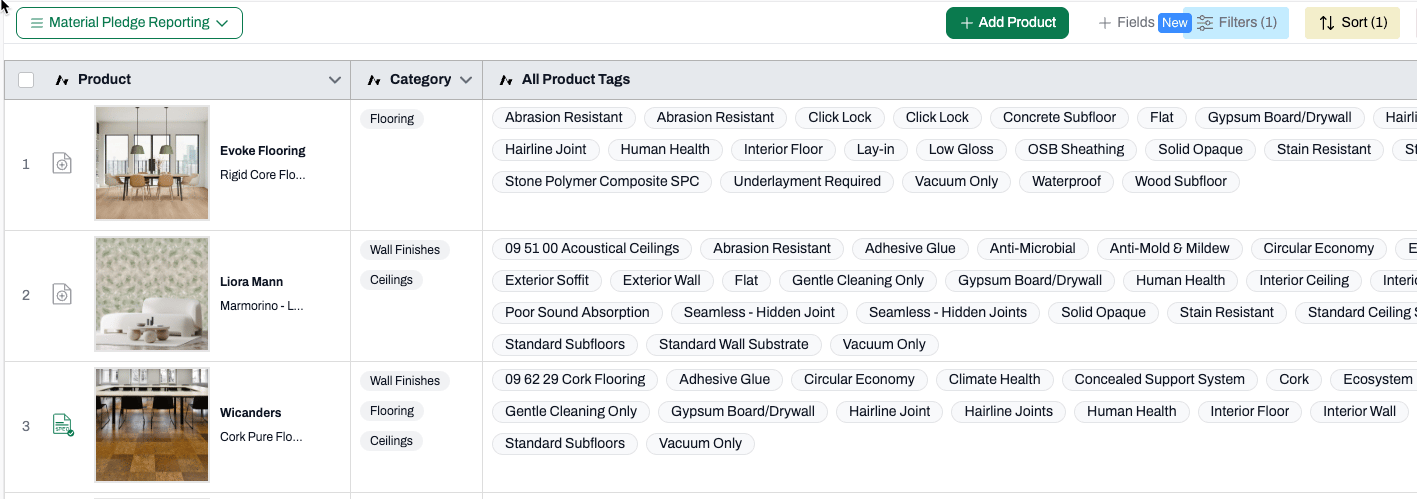
* **All Product Tags** (includes all impact category tags)
* **Document fields** in all five categories
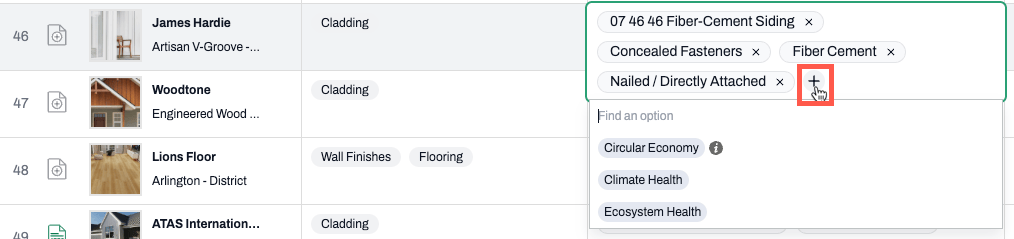
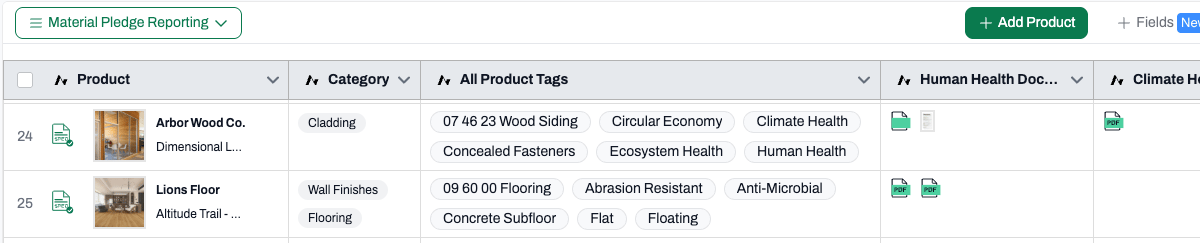 **Note:** To better visualize all the tags, change [cell height](/help-center/working-on-projects/height-in-schedules) to large. You might also need to widen the All Product Tags column to see all tags. To do so, simply click and drag the vertical line. If tags don't show up, click on the + sign in the cell to check whether there are additional tags.
 #### Where to Find Certification Documentation?
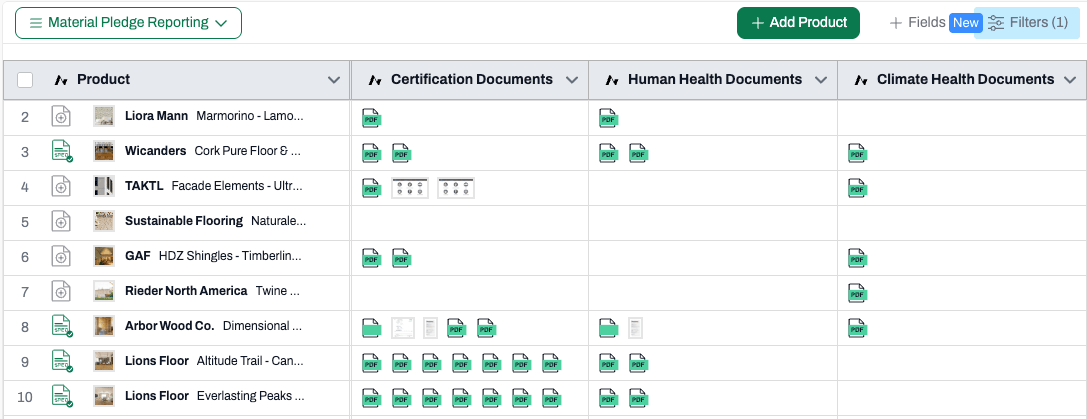
The certification documents can be found under the **Certification Documents** field, or the respective pledge category’s document field (**Climate Health Documents, Human Health Documents, Circular Economy Documents, Ecosystem Health Documents, Social health & Equity Documents**). To see a document, simply click on the icon within the cell.
#### Where to Find Certification Documentation?
The certification documents can be found under the **Certification Documents** field, or the respective pledge category’s document field (**Climate Health Documents, Human Health Documents, Circular Economy Documents, Ecosystem Health Documents, Social health & Equity Documents**). To see a document, simply click on the icon within the cell.
 #### 4. Using filters to display products
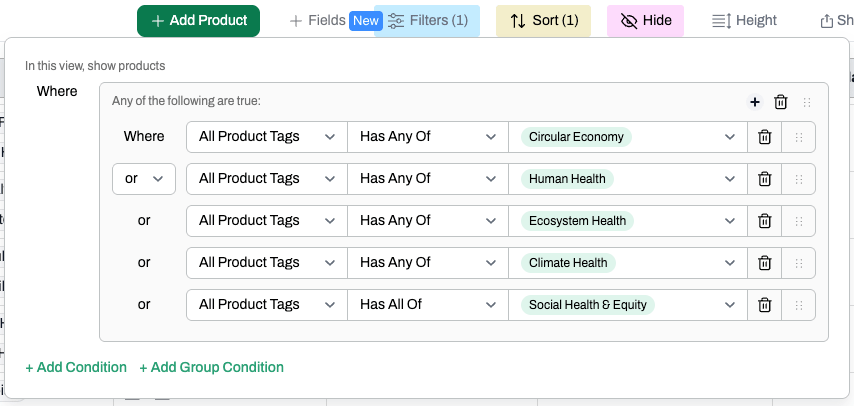
* Click on **Filters** and **Add a Group Condition**
* Set up the filters to show only products where the All Product Tags field includes at least one of the impact categories
* The view will update and only products that meet the criteria will be displayed
#### 4. Using filters to display products
* Click on **Filters** and **Add a Group Condition**
* Set up the filters to show only products where the All Product Tags field includes at least one of the impact categories
* The view will update and only products that meet the criteria will be displayed
 #### See Material Pledge Information on Product Page
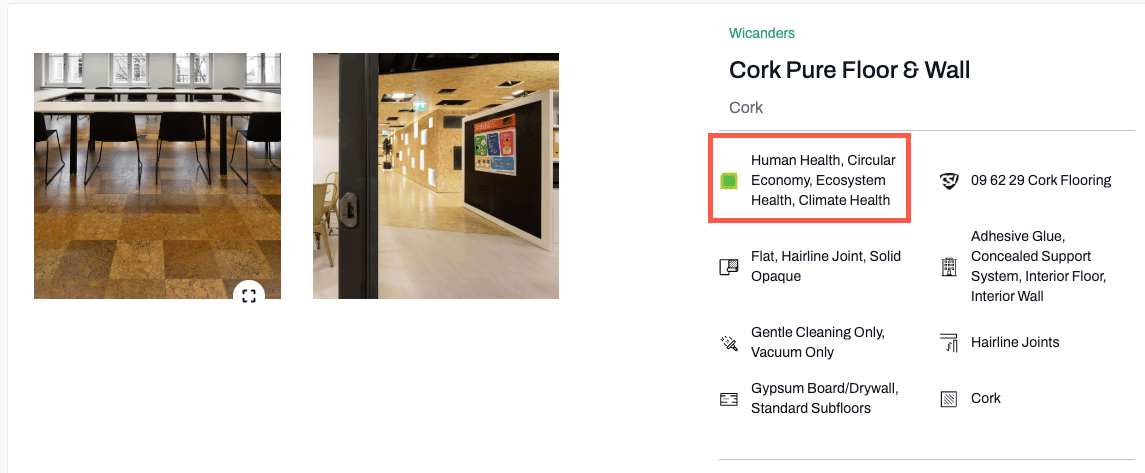
Note that when searching for products, or clicking on a product in the project schedule, information about the impact category appears on the product page.
#### See Material Pledge Information on Product Page
Note that when searching for products, or clicking on a product in the project schedule, information about the impact category appears on the product page.
 #### **5. Collaborate and Export the Report**
While working on the report, you may collaborate with teammates added to the project in different ways:
* **[Add a Comments field](/help-center/working-on-projects/tag-collaborators-in-comments)** and tag teammates so they can respond and keep the conversation organized.
* **[Share the Material Pledge Reporting](/help-center/working-on-projects/share-schedules)** [**view**](/help-center/working-on-projects/share-schedules) with internal and external collaborators: Choose which fields they can see and edit, so they can review and and add input to the report as needed.
* When the report is finalized, **[export the Material Pledge Reporting view](/help-center/working-on-projects/csv-export-from-schedules)** as a .csv file.
#### **5. Collaborate and Export the Report**
While working on the report, you may collaborate with teammates added to the project in different ways:
* **[Add a Comments field](/help-center/working-on-projects/tag-collaborators-in-comments)** and tag teammates so they can respond and keep the conversation organized.
* **[Share the Material Pledge Reporting](/help-center/working-on-projects/share-schedules)** [**view**](/help-center/working-on-projects/share-schedules) with internal and external collaborators: Choose which fields they can see and edit, so they can review and and add input to the report as needed.
* When the report is finalized, **[export the Material Pledge Reporting view](/help-center/working-on-projects/csv-export-from-schedules)** as a .csv file.
 ***
## Best Practices for Materials Pledge Reporting with the Material Hub
1. **Start Early** - Begin documenting materials well before the May 31 reporting deadline
2. **Be Selective** - Focus on materials with the greatest impact or those that exemplify your firm's commitment
3. **Collaborate Effectively** - Assign specific team members to document different product categories
4. **Document Processes** - Note the strategies used to evaluate and select materials
5. **Leverage Existing Standards** - Use established certifications like Cradle-to-Cradle to demonstrate compliance
6. **Build Institutional Knowledge** - Use your Library in the Materials Hub to preserve material knowledge for future projects
The AIA Materials Pledge represents a significant opportunity for architects and designers to transform the building materials industry through more intentional specification practices. Get started with the Materials Pledge template in the Material Hub to streamline your firm's reporting process, demonstrate compliance, and contribute to the collective industry knowledge about sustainable materials.
***
## Best Practices for Materials Pledge Reporting with the Material Hub
1. **Start Early** - Begin documenting materials well before the May 31 reporting deadline
2. **Be Selective** - Focus on materials with the greatest impact or those that exemplify your firm's commitment
3. **Collaborate Effectively** - Assign specific team members to document different product categories
4. **Document Processes** - Note the strategies used to evaluate and select materials
5. **Leverage Existing Standards** - Use established certifications like Cradle-to-Cradle to demonstrate compliance
6. **Build Institutional Knowledge** - Use your Library in the Materials Hub to preserve material knowledge for future projects
The AIA Materials Pledge represents a significant opportunity for architects and designers to transform the building materials industry through more intentional specification practices. Get started with the Materials Pledge template in the Material Hub to streamline your firm's reporting process, demonstrate compliance, and contribute to the collective industry knowledge about sustainable materials.